Your LiFePO4 battery can look “fine” right up until lost capacity, cell imbalance, or charging issues start costing you real money.
Unlike lead-acid batteries, lithium-iron phosphate packs do not always give obvious warning signs when their health begins to decline. Voltage alone can be misleading, especially on LiFePO4’s famously flat discharge curve.
Proper monitoring means tracking the right signals: state of charge, cell voltage balance, internal resistance, temperature, charge cycles, and BMS data. Together, these reveal whether your battery is aging normally or developing a problem early.
This step-by-step guide shows how to assess LiFePO4 health accurately, spot warning signs before failure, and extend the service life of your battery system.
What LiFePO4 Battery Health Means: SOH, SOC, Voltage, Temperature, and Cycle Life Explained
LiFePO4 battery health is not one number. A good battery monitoring system looks at state of health, state of charge, voltage behavior, temperature, and cycle history together-especially in solar storage, RV power systems, marine batteries, and off-grid backup setups.
SOH means State of Health, or how much usable capacity the battery still has compared with when it was new. SOC means State of Charge, but with LiFePO4 batteries, voltage stays very flat for most of the discharge curve, so a simple voltmeter can mislead you unless the battery has been resting.
- Voltage: Useful for spotting imbalance, overcharge, or deep discharge, but not ideal as the only fuel gauge.
- Temperature: Critical because charging below freezing can damage cells unless the BMS blocks charging or the battery has self-heating.
- Cycle life: A cycle is based on energy used, not just plugging in a charger once.
In real use, I’ve seen RV owners think a 12V LiFePO4 battery was “full” because voltage looked high, while a shunt-based monitor showed it was only partly charged after running an inverter overnight. Tools like VictronConnect with a SmartShunt, a Bluetooth BMS app, or a quality battery capacity tester give far better data for maintenance decisions.
The practical goal is simple: track trends, not just snapshots. If capacity drops, cells drift out of balance, charging temperature is often too low, or cycles are climbing fast, you can adjust charger settings, improve ventilation, or plan replacement costs before the battery fails in service.
How to Monitor LiFePO4 Health Step by Step Using a BMS, Multimeter, and Capacity Test
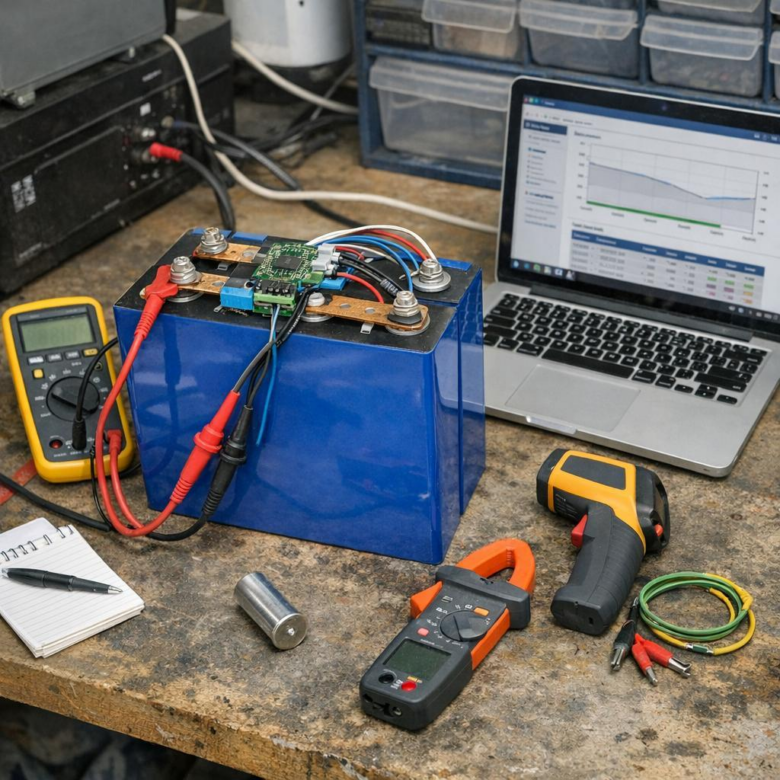
Start with the battery management system because it gives the fastest view of LiFePO4 battery health. Open the app or display for your lithium battery monitor and check pack voltage, individual cell voltage, temperature, charge cycles, and any fault history; tools like Victron SmartShunt, Daly BMS, or JK BMS are commonly used in solar battery storage, RV, and marine setups.
- Step 1: Confirm all cells are closely balanced at rest, especially near full charge.
- Step 2: Use a quality multimeter, such as a Fluke 117, to verify pack voltage at the terminals and compare it with the BMS reading.
- Step 3: Run a controlled capacity test with a DC load tester or inverter load to measure usable amp-hours.
For a practical capacity test, fully charge the battery, let it rest, then discharge it at a moderate load while recording amp-hours until the BMS low-voltage cutoff or your safe stop point is reached. For example, a 100Ah LiFePO4 battery in an off-grid solar system powering a 300W inverter load should deliver close to its rated usable capacity if the cells are healthy and properly balanced.
Watch for warning signs: one cell dropping faster than the others, voltage sag under normal load, unexpected BMS shutdowns, or capacity far below the label rating. In real service, I’ve seen “bad batteries” turn out to be loose terminals, undersized cables, or an inaccurate cheap battery monitor, so always verify readings before replacing expensive lithium battery equipment.
Common LiFePO4 Monitoring Mistakes That Lead to Inaccurate Battery Health Readings
One of the biggest mistakes is judging LiFePO4 battery health by voltage alone. Unlike lead-acid batteries, LiFePO4 cells hold a very flat voltage curve, so a battery can look “fine” at 13.2V while its actual state of charge is much lower than expected.
Another common issue is using a cheap battery monitor that has not been calibrated after installation. If the shunt rating, battery capacity, or charge efficiency settings are wrong, even a quality battery monitoring system like VictronConnect can display misleading state-of-charge data.
- Ignoring cell imbalance: Pack voltage may look normal while one cell is drifting too high or too low.
- Monitoring only under no load: Voltage readings are more useful when checked during charging, resting, and real discharge conditions.
- Using the wrong charger profile: A lead-acid charger or incorrect inverter-charger setting can distort capacity readings and reduce reliability.
In real solar battery bank setups, I often see inaccurate readings after owners add extra batteries without resetting the amp-hour capacity in the Bluetooth BMS app. The system keeps calculating based on the old battery size, so the display may show 100% even though the larger bank has not fully charged.
Temperature is another detail people overlook. A LiFePO4 battery installed in an RV, marine system, or off-grid cabin can behave differently in cold weather, especially if the BMS blocks charging below safe limits.
For the most reliable battery health check, compare data from the BMS app, a calibrated shunt monitor, and a digital multimeter. When those readings disagree, trust the calibrated shunt for capacity tracking and use cell-level BMS data to spot early balance or charging problems.
Key Takeaways & Next Steps
Healthy LiFePO4 batteries reward consistency. The real value of monitoring is not collecting data, but spotting small changes before they become expensive failures. Treat voltage, temperature, capacity, and BMS alerts as decision signals, not isolated numbers.
- If readings remain stable, continue normal use and routine checks.
- If trends drift gradually, adjust charging, load, or storage conditions.
- If imbalance, overheating, or rapid capacity loss appears, stop guessing and investigate immediately.
A disciplined monitoring routine helps you decide when to keep using, rebalance, service, or replace the battery with confidence.