Why does a “smart” dimmer make expensive LED lights flicker like cheap bulbs?
In most cases, the problem is not the LED itself-it is a mismatch between the dimmer, the bulb’s driver, the circuit load, or the way the dimming range is configured.
Smart dimmers add convenience, schedules, scenes, and voice control, but they also introduce settings that can either stabilize LEDs or make flicker worse.
This guide explains how to control smart dimmers correctly, choose compatible LEDs, adjust minimum brightness levels, and eliminate the most common causes of LED flickering before replacing hardware unnecessarily.
Why Smart Dimmers Cause LED Flickering: Load, Compatibility, and Dimming Method Basics
LED flickering often starts with a mismatch between the smart dimmer, the bulb driver, and the electrical load. Unlike old incandescent bulbs, LEDs use very little wattage, so some smart dimmer switches cannot detect enough load to operate smoothly. This is common in bedrooms, hallways, and recessed lighting circuits with only one or two low-watt LED bulbs.
The biggest issue is compatibility. Many smart dimmers are designed for specific dimming methods, usually forward-phase or reverse-phase dimming. If you pair a forward-phase dimmer with LED bulbs that perform better on reverse-phase control, you may see pulsing, buzzing, random flashes, or flicker at low brightness.
- Minimum load: Some dimmers need a certain wattage to stay stable.
- Bulb driver quality: Cheap LED drivers often flicker more during dimming.
- Neutral wire requirement: No-neutral smart dimmers may leak small current through the bulb.
For example, a homeowner may install a smart dimmer on four 6-watt LED downlights and notice flicker below 30%. In practice, setting a minimum brightness level in the Lutron App or replacing the bulbs with dimmer-approved LED models often solves the problem without rewiring.
Before buying a smart lighting control system, check the dimmer’s LED compatibility list, load rating, neutral wire requirements, and supported bulb types. Spending a little more on certified dimmable LED bulbs, a quality smart switch, or an LED bypass capacitor can prevent service calls, wasted money, and annoying nighttime flicker.
How to Configure Smart Dimmer Settings to Stabilize LED Performance
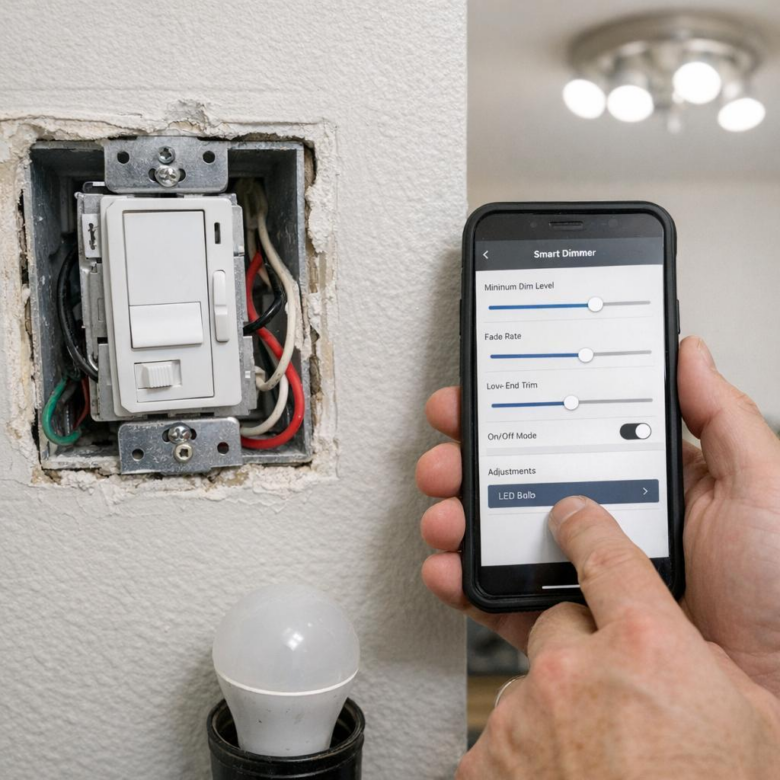
Start by opening your smart dimmer app and checking the load type, dimming mode, and brightness range. Many LED flickering issues come from a smart dimmer switch trying to dim below the bulb’s stable operating level, especially with low-wattage recessed lights or decorative LED fixtures.
If your dimmer supports it, choose trailing-edge or LED-compatible dimming instead of forward-phase dimming. In platforms like Lutron Caséta, Leviton Decora Smart, or TP-Link Kasa, this may appear as trim adjustment, bulb calibration, or minimum brightness setting rather than a technical dimming mode.
- Set the low-end trim: Raise the minimum brightness until the LED stops pulsing or flashing.
- Limit the high-end trim: Reduce the maximum level if lights buzz or shimmer at full brightness.
- Disable fade effects: Long fade-on or fade-off settings can trigger instability with cheaper dimmable LED bulbs.
A practical example: in a kitchen with six dimmable LED downlights, flickering may appear only when the lights are below 20%. Setting the minimum trim to 25-30% in the dimmer app often stabilizes the circuit without replacing the entire lighting system.
Also check automation settings. Motion sensors, schedules, and voice assistant routines can sometimes send rapid on/off or partial-dim commands that make LED lights flicker, so simplify automations before assuming the dimmer is defective.
For best results, pair the dimmer with bulbs listed on the manufacturer’s LED compatibility chart. Spending a little more on compatible dimmable LED bulbs usually costs less than hiring an electrician later to troubleshoot nuisance flicker, buzzing, or poor smart home lighting performance.
Common Smart Dimmer Mistakes That Trigger LED Flicker-and How to Fix Them
One of the most common causes of LED flickering is pairing a smart dimmer switch with bulbs that are not designed for dimming. Always check the bulb label for “dimmable LED” and review the dimmer’s compatibility list before buying; brands like Lutron, Leviton, and TP-Link often publish tested bulb charts online.
Another mistake is setting the dimmer range too low. Many LED bulbs cannot operate cleanly below a certain power level, so they shimmer, pulse, or shut off. In the Lutron Caséta app, for example, you can adjust the low-end trim so the lights stop dimming before they reach the flicker zone.
- Wrong load type: Use an LED-rated smart dimmer, not an old incandescent dimmer.
- No neutral wire: Some smart switches need a neutral for stable power and reliable Wi-Fi control.
- Mixed bulbs: Avoid combining different LED brands or wattages on the same dimmer circuit.
A real-world example: a homeowner replaces six recessed lights with cheap dimmable LEDs, then adds a smart dimmer and notices flicker at 20% brightness. The fix is usually not rewiring the whole room; it may be as simple as raising the minimum dim level or switching to better LED downlights with a compatible driver.
If flicker continues after these checks, use a non-contact voltage tester and confirm the wiring, especially in older homes. For high-end lighting control systems, hiring a licensed electrician can save money by preventing damaged switches, nuisance breaker trips, and repeated replacement costs.
Final Thoughts on How to Control Smart Dimmers to Prevent LED Flickering Issues
Preventing LED flicker ultimately comes down to choosing components that work as a system, not forcing mismatched devices to behave. Before replacing bulbs or dimmers, verify compatibility, load requirements, wiring quality, and dimming range settings. The best decision is often not the cheapest dimmer or brightest bulb, but the combination proven to operate smoothly together. If flicker persists after setup adjustments, treat it as a signal to upgrade to a compatible LED-rated smart dimmer, add the required load correction device, or consult an electrician. A stable, quiet dimming experience is achievable when control, power, and lighting are properly matched.